

pkrp-about
This activity is designed to connect learners with powerful online tools and the skills to use them, in order to enhance their understanding of their local environment and the significance of the Matariki and Puanga stars in Aotearoa New Zealand.
With permission and guidance, learners will practise using the internet and their digital devices safely and effectively to explore a precise, interactive simulation of the sky in their local area. Identify the Matariki cluster (Pleiades) and star Puanga (Rigel), and manipulate the simulation to experiment with the conditions of the sky across time, location, three-dimensional point of view and more.
pkrp-base-req
{External}
[link-url] https://stellarium-web.org/
[heading] Companion Platform
[sidebar-label] Companion Platform
[sidebar-pill] Companion
[sidebar-pill-sublabel] Connects with
[title] Stellarium Web (Homepage)
[title-alt] Stellarium Web
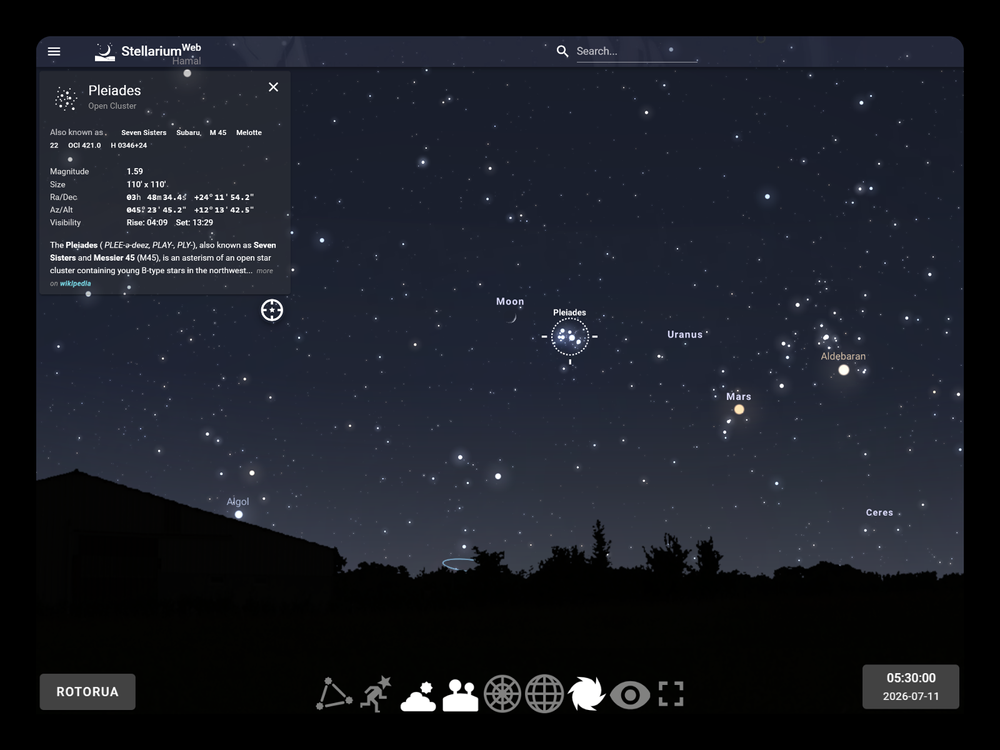
[card-description] An online, browser-based planetarium that simulates the night sky to shows stars, planets, constellations, and other deep-sky objects using interactive controls that can set exact conditions like location and time.
pkrp-links
pkrp-dt-detail
ctdt-po1
Understanding that Stellarium Web is a digital system that takes inputs and generates a precise output
Recognising that manipulating input variables changes the output result
dddo-po1
Using a digital tool purposefully to explore and investigate a specific topic
Navigating and interacting with a complex online platform
Evaluating connections between digital representations and the real world
pkrp-cc-detail
science
Investigating the night sky and Earth's relationship with the wider cosmos
social-sciences
Supporting understanding and cultural significance of Matariki & Puanga
pkrp-diff
Assign different stars or other celestial objects for learners to search for and report on their visibility at different times and in different places.
pkrp-ext
Compare between seasons and locations the visibility of Matariki, Puanga or other celestial objects. Then report on what features are most prominent in your local night sky at different times of year.
Use the online tools to find Matariki and Puanga at a time that they’re visible in your local area, then arrange to safely go outside and spot the stars!
pkrp-notes
Teachers should consider:
Device Preparation as a pre-lesson task, including charging batteries and connecting to the internet.
Group Assignments and logistics, including supporting student collaboration and content focus.
External resource vetting, to become familiar with the resource (in this case the website Stellarium Web), to develop a basic understanding of how to use it safely and effectively, and to ensure it is accessible on school devices and networks. See Digital Safety & Wellbeing guidance below for more.
pkrp-dsw
This activity involves using the internet through a web browser. It’s important to take steps to make sure device use is safe, supervised, and purposeful throughout.
Stellarium Web is a reputable, open-source astronomy tool, yet as with any external website used in the classroom, kaiako must plan and follow through carefully in order to provide a safe and focused experience for ākonga.
General Guidance
Set clear expectations around safe and purposeful device use at the start of each lesson.
Support ākonga to know that if they encounter content that feels inappropriate, confusing, or upsetting during their research that they can flag this with kaiako without concern.
Remind ākonga of your school's digital use agreement before beginning any lesson that involves the internet or a third-party digital platform.
Before the activity
Use this activity as a natural starting point for conversations about evaluating online tools and using the internet safely and effectively.
Discuss what makes an online source reliable, and develop an understanding of why or why not Stellarium Web might be used as a trusted digital tool for scientific and educational purposes.
Discuss information sharing and permissions settings during internet use, specifically with regard to live location sharing during this activity. Consider together why it’s important that we do not to accept location sharing requests on school devices, and should instead enter a location manually using the search function.
During the activity
Consider beginning by opening Stellarium Web on a shared screen or projector to demonstrate as a group before ākonga use it more independently.
Set a clear, focused task (like locating Matariki and Puanga at a specific time and place) so that device use remains purposeful.
Supervise internet use throughout, circulating actively to monitor and support ākonga.
Encourage ākonga to treat all sources about Matariki, particularly those representing mātauranga Māori, with respect and care as it’s part of a living, culturally significant body of knowledge.
pkrp-lp
>>> y4-6 | Y4-6 (Directed, Class Project)
Model digital skills and how to use digital tools. Encourage learners to observe, discuss, and make decisions together as a group or whole class.
>>> y7-8 | Y7-8 (Guided, Group Project)
Support the use of digital tools to build digital skills, collaborating in a group to accomplish a goal and share experiences.
>>> y9plus | Y9+ (Independent)
Supervise the application of digital skills and tool, individually or in groups, to accomplish a goal and communicate results.